
Monitor Steem & SBD Metrics with Steemit Toolbar
Overview
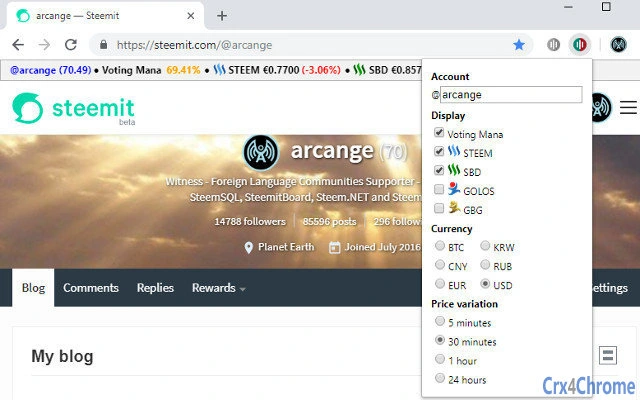
The Steemit Toolbar is a desktop application designed to assist users within the Steem blockchain ecosystem by providing real-time monitoring of critical account metrics. It enables users to track their Voting Power, RC Mana, and the current market prices of STEEM and SBD, along with historical price trends. This tool is particularly useful for content creators, community moderators, and active participants in Steem-based platforms who rely on timely data to make informed decisions about voting, posting, and token management.
The software supports multiple platforms, including Windows and Mac, and has been updated to version 1.5.4 with significant performance improvements and enhanced resource management. The codebase has been completely rewritten to ensure smoother operation and better responsiveness. Additional features include support for multiple accounts, expanded platform integration across Steem and Golos networks, and improved compatibility with various third-party websites such as busy.org, steempeak.com, and steemspeak.com.
Target users include active Steem community members, digital content publishers, and blockchain enthusiasts who require immediate access to account health indicators and market data. The application runs as a browser toolbar, integrating directly into the user’s workflow without requiring frequent manual checks. Its lightweight design and low installation size of 1.2 MB make it accessible even on systems with limited resources.
Key Features & Capabilities
- Real-time Monitoring of Voting Power and RC Mana – Users can instantly view their current Voting Power and RC (Resource Credit) Mana levels, essential metrics for determining voting capacity and posting activity.
- Market Price Tracking for STEEM and SBD – The toolbar displays average prices of STEEM and SBD across major markets, along with price evolution trends to help users anticipate market shifts.
- Multi-Account Support – Version 1.5.4 introduces the ability to manage and monitor multiple Steem accounts from a single interface, improving workflow efficiency for users with several profiles.
- Expanded Platform Compatibility – The toolbar now supports a wide range of platforms including steemitwallet.com, partiko.app, busy.org, golos.blog, goldvoice.club, steempeak.com, and steemspeak.com, ensuring consistent functionality across different communities.
- Quick Access to Exchanges – A built-in shortcut allows users to jump directly to Bittrex, facilitating quick trading decisions based on real-time price data.
- Localization Support – Available in multiple languages including French, Spanish, Russian, and Portuguese, enhancing accessibility for international users.
- Enhanced Stability and Performance – The complete code rewrite in version 1.5.4 improves resource usage and overall responsiveness, reducing lag and improving reliability during extended use.
These features are especially valuable during high-activity periods such as content campaigns, voting rounds, or market volatility. By consolidating essential data into a single, always-visible interface, the toolbar minimizes the need to navigate between multiple tabs or platforms, streamlining user engagement within the Steem ecosystem.
User Interface, Workflow & Performance
The Steemit Toolbar features a clean, minimalistic interface designed for quick readability and efficient access. It integrates directly into the browser’s toolbar area, displaying key metrics in a compact, non-intrusive layout. Navigation is intuitive, with tooltips and hover-based popups providing additional context without disrupting the user’s workflow.
Workflow efficiency is enhanced by the toolbar’s ability to auto-refresh data at regular intervals, ensuring users always have up-to-date information without manual intervention. The interface remains responsive even when multiple accounts are active, though exact performance details were not specified by the developer.
Resource usage behavior is not publicly documented, but the application’s lightweight footprint of 1.2 MB suggests low impact on system performance. The developer did not provide additional system requirements, and general performance observations are based on typical behavior of similar desktop utilities. Stability appears improved in the latest version due to the complete code rewrite, with recent updates addressing known bugs related to popup display and node connectivity.
Compatibility & System Requirements
The Steemit Toolbar is compatible with Windows and Mac operating systems. It has been officially released in version 1.5.4, with an installation size of 1.2 MB. The developer did not specify exact system requirements, including minimum CPU, RAM, or disk space thresholds.
Platform compatibility information is limited to the listed operating systems. No details were provided regarding specific versions of Windows or macOS, nor were there any mentions of hardware acceleration, internet connectivity needs, or background service dependencies. Users are advised to ensure their system meets standard requirements for running modern browser extensions and desktop applications.
Pros and Cons
Pros
- Lightweight installation at just 1.2 MB
- Real-time tracking of Voting Power and RC Mana
- Support for multiple Steem and Golos accounts
- Wide platform integration across major Steem-based websites
- Quick access to Bittrex exchange for trading decisions
- Multi-language localization for global accessibility
- Regular updates with performance improvements and bug fixes
Cons
- Exact system requirements not publicly listed
- Performance metrics and resource usage details not provided
- Developer background not disclosed
- Limited information on update frequency and support lifecycle
- Relies on external blockchain nodes, which may affect reliability
FAQ Section
Is the Steemit Toolbar compatible with Windows and Mac?
Yes, the software is officially supported on both Windows and Mac operating systems.
Is the Steemit Toolbar free to use?
Yes, the Steemit Toolbar is available at no cost. No payment is required for access or use.
Does the toolbar require an internet connection?
Yes, an active internet connection is necessary to retrieve real-time data from Steem blockchain nodes and market APIs.
Can I use multiple accounts with the toolbar?
Yes, version 1.5.4 includes full support for managing and monitoring multiple Steem and Golos accounts from a single interface.
How often does the toolbar update its data?
The toolbar automatically refreshes data at regular intervals to ensure users receive up-to-date information on Voting Power, RC Mana, and market prices.
Final Thoughts + CTA
The Steemit Toolbar delivers a focused, efficient solution for users deeply involved in the Steem and Golos blockchain communities. With its real-time monitoring of key account metrics and market trends, it empowers content creators and active participants to make timely, data-driven decisions. The addition of multi-account support, enhanced platform compatibility, and a complete code rewrite for better performance makes version 1.5.4 a significant improvement over previous iterations.
While some technical details such as system requirements and performance benchmarks remain unspecified, the tool’s lightweight nature and consistent updates suggest reliability and ongoing development. It is particularly well-suited for professionals and enthusiasts who rely on constant access to account health and market data.
Download Steemit Toolbar now







